
- How to Display Tax-Inclusive Prices in LatePoint
- Bundled Services
- Managing Bookings With The New Shopping Cart
- Set custom start date for the calendar on your booking form
- How to make Phone Number a required field?
- How to Show Only Services or Only Bundles in a Booking Form
- How to Set Base Fee for Group Bookings
- How to Show Custom Display Price for Bundles
- Add booking form directly on a page
- Redirect to a custom “Thank you” page after booking is complete.
- Add custom content before or after booking steps
- Customize Book Button Appearance
- Add preselected Agent, Service or Location on Book Appointment Button or Form
- How to change time slot style on the calendar?
- Custom CSS for changing colors
- Booking Form Editor
- Specify which services, agents and locations will be available on a booking form
- How to pick specific categories to be displayed on the booking form
- How to show only services from specific category
- Set custom fonts for the booking form
- How to hide a Summary and Side Panel to get a compact booking form
- Change text in “Questions” section of the booking form
- How to Replace LatePoint Branding with Your Own
- Where should I store translated language .po and .mo files
- How to translate LatePoint plugin to your language
- How to configure Social Login with Google
- How to configure social login with Facebook
- How to Enable CSV Downloads for LatePoint Agent Users
- How to Hide the Price Breakdown if the Service Price is Set to Zero
- How to Change the Start Day of the Calendar in LatePoint
- How to Configure Customer Authentication and OTP Verification in LatePoint
- How to Set No-Show Customer Restrictions
- How to Show or Hide the Coupon Field
- How to setup Facebook Pixel
- How to Disable the Messaging Functionality in LatePoint
- How to upgrade to Version 5?
- How to Update to Version 5.1.0
- Which addons are part of a PRO bundle in version 5?
- How to deactivate my license from a website I no longer use.
- Redirect to a custom “Thank you” page after booking is complete.
- How to add a link to terms of service checkbox custom field
- Edit content of the left panel section
- How to enable self hosted Google Calendar setup?
- How does LatePoint send emails?
- How to enable debug log?
- Add to Calendar link is not working
- Getting “One of the plugins is invalid” error when installing add-ons
- Error: unexpected ‘int’, expecting function…
- Service categories not showing during booking process
- Error: Cannot read properties of null (reading: verifyBuyer)
- WordPress Users still can’t login, even when “Use WordPress users as customers” option is checked
- New service is being created when trying to update existing service.
- Auto-sync of events from Google Calendar is not working
How to Set No-Show Customer Restrictions
No-Show Restrictions allow you to restrict bookings for customers who repeatedly miss their appointments.
To configure it, go to LatePoint > Settings > No-Show Restrictions and enable “No-Show Customers Restrictions.”
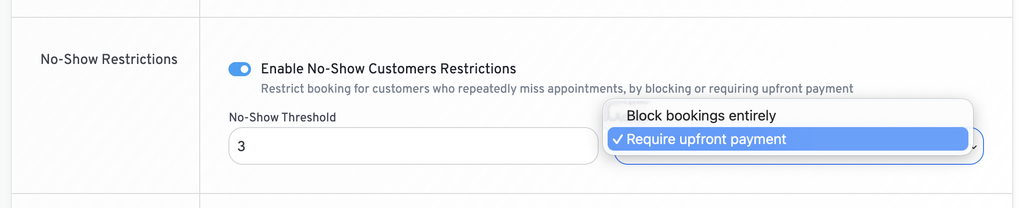
You can configure the following options:
- No-Show Threshold: Set the number of no-shows after which the restriction should apply.
- Action: Choose what happens when the threshold is reached:
- Block bookings entirely
- Require upfront payment
For example, if you set the threshold to 1 and select “Require upfront payment,” a customer will be required to pay upfront for future bookings after their first no-show.
When an appointment is marked as “No-Show,” LatePoint counts it toward the customer’s no-show threshold automatically.
Note: This is a PRO feature. Make sure you have installed and activated the Pro Features add-on and activated your license to use this functionality.
We don't respond to the article feedback, we use it to improve our support content.