
- How to Display Tax-Inclusive Prices in LatePoint
- Bundled Services
- Managing Bookings With The New Shopping Cart
- Set custom start date for the calendar on your booking form
- How to make Phone Number a required field?
- How to Show Only Services or Only Bundles in a Booking Form
- How to Set Base Fee for Group Bookings
- How to Show Custom Display Price for Bundles
- Add booking form directly on a page
- Redirect to a custom “Thank you” page after booking is complete.
- Add custom content before or after booking steps
- Customize Book Button Appearance
- Add preselected Agent, Service or Location on Book Appointment Button or Form
- How to change time slot style on the calendar?
- Custom CSS for changing colors
- Booking Form Editor
- Specify which services, agents and locations will be available on a booking form
- How to pick specific categories to be displayed on the booking form
- How to show only services from specific category
- Set custom fonts for the booking form
- How to setup Facebook Pixel
- How to Disable the Messaging Functionality in LatePoint
- How to upgrade to Version 5?
- How to Update to Version 5.1.0
- Which addons are part of a PRO bundle in version 5?
- How to deactivate my license from a website I no longer use.
- Redirect to a custom “Thank you” page after booking is complete.
- How to add a link to terms of service checkbox custom field
- Edit content of the left panel section
- How to enable self hosted Google Calendar setup?
- How does LatePoint send emails?
- How to enable debug log?
- Add to Calendar link is not working
- Getting “One of the plugins is invalid” error when installing add-ons
- Error: unexpected ‘int’, expecting function…
- Service categories not showing during booking process
- Error: Cannot read properties of null (reading: verifyBuyer)
- WordPress Users still can’t login, even when “Use WordPress users as customers” option is checked
- New service is being created when trying to update existing service.
- Auto-sync of events from Google Calendar is not working
- Understanding limitations of Google App user type
- Data missing after update or your license key is not working
- I am getting “Invalid Request” error when creating or updating records
- LatePoint can not reach my website when setting up Google Calendar or Stripe Connect
- Prevent Agents being redirected to WooCommerce “My Account” Page when trying to login to LatePoint Agent Account
- When customers try login in to Customer Dashboard they are re-directed to the same login page again
- Google Calendar Connect shows app is not verified message
- Google Authorization Error. Clicking Connect Button on Google Calendar not working
- How to fix Verification Error on the LatePoint Booking Form
- How to Fix the “Error: Email Address Has to Be Unique” While Creating Appointments via Admin UI
- How to Roll Back to a Previous Version of LatePoint
- Load LatePoint Front-End Scripts Only on Specific Pages
- How to Fix “The selected payment method is not available. Please choose a valid payment method and try again.”
- How to Fix “Stripe Connect Account ID Not Set” Error
Service categories not showing during booking process
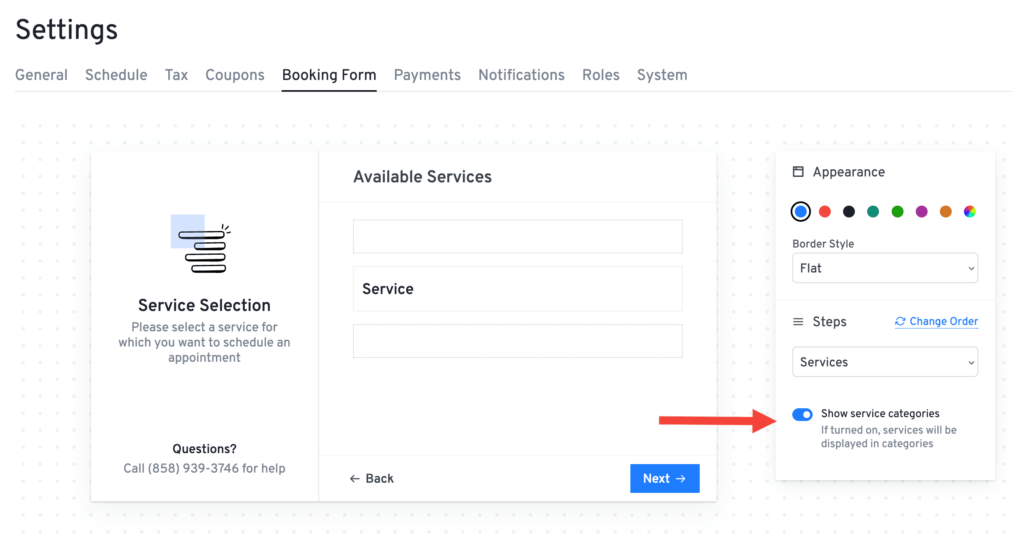
To enable the service categories step in the booking form, navigate to Settings > Booking Form and enable on the Show Service Categories toggle. This setting allows service categories to appear as a step during the booking process.
Was this doc helpful?
What went wrong?
We don't respond to the article feedback, we use it to improve our support content.