
- How to Display Tax-Inclusive Prices in LatePoint
- Bundled Services
- Managing Bookings With The New Shopping Cart
- Set custom start date for the calendar on your booking form
- How to make Phone Number a required field?
- How to Show Only Services or Only Bundles in a Booking Form
- How to Set Base Fee for Group Bookings
- How to Show Custom Display Price for Bundles
- Add booking form directly on a page
- Redirect to a custom “Thank you” page after booking is complete.
- Add custom content before or after booking steps
- Customize Book Button Appearance
- Add preselected Agent, Service or Location on Book Appointment Button or Form
- How to change time slot style on the calendar?
- Custom CSS for changing colors
- Booking Form Editor
- Specify which services, agents and locations will be available on a booking form
- How to pick specific categories to be displayed on the booking form
- How to show only services from specific category
- Set custom fonts for the booking form
- How to setup Facebook Pixel
- How to Disable the Messaging Functionality in LatePoint
- How to upgrade to Version 5?
- How to Update to Version 5.1.0
- Which addons are part of a PRO bundle in version 5?
- How to deactivate my license from a website I no longer use.
- Redirect to a custom “Thank you” page after booking is complete.
- How to add a link to terms of service checkbox custom field
- Edit content of the left panel section
- How to enable self hosted Google Calendar setup?
- Add a trigger to custom element to open a booking form
- How to Create Payment Links in LatePoint
- How to Manage Assets
- How to Pre-fill Customer Fields from URL Parameters
- How to allow agents log into their own dashboard to manage their schedules and appointments
- Generate Client ID and Secret for Google Calendar integration
- How to Completely Remove All LatePoint Data on Plugin Deletion
- How to Automatically Delete Old Activity Log Entries
- Understanding Payment Processing Fees
- How to Issue Refunds in LatePoint
- How to Use Invoices in LatePoint
- How to Hide the “New Appointment” Button and Tab on the Customer Dashboard
- How does LatePoint send emails?
- How to enable debug log?
- Add to Calendar link is not working
- Getting “One of the plugins is invalid” error when installing add-ons
- Error: unexpected ‘int’, expecting function…
- Service categories not showing during booking process
- Error: Cannot read properties of null (reading: verifyBuyer)
- WordPress Users still can’t login, even when “Use WordPress users as customers” option is checked
- New service is being created when trying to update existing service.
- Auto-sync of events from Google Calendar is not working
How to Pre-fill Customer Fields from URL Parameters
LatePoint Pro can automatically pre-fill customer fields on the booking form using URL parameters. This is useful when linking to your booking page from emails, ads, CRMs, or other external sources.
- Only fields that are enabled on the booking form can be pre-filled.
- URL parameters only fill empty fields. They do not overwrite existing customer information or values entered by the customer.
- Values are validated before being applied. Invalid values are ignored.
- Once applied, the pre-filled values remain available throughout the booking flow.
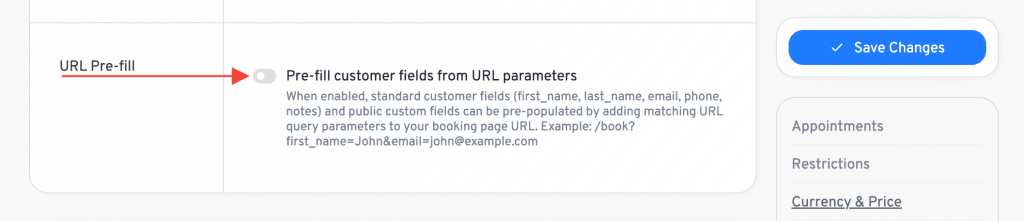
Enable the Feature
- Go to LatePoint > Settings > General.
- Under the Customer section, enable Pre-fill customer fields from URL parameters.
- Save your settings.
Supported Form Fields
You can pre-fill the following standard customer fields:
- first_name
- last_name
- phone
- notes
You can also pre-fill custom customer fields by using the custom field’s ID as the URL parameter.
Example
To pre-fill the customer’s first name and email address:
https://yoursite.com/book?first_name=John&[email protected]
When the customer opens this link, the booking form automatically fills the corresponding fields.
Was this doc helpful?
What went wrong?
We don't respond to the article feedback, we use it to improve our support content.